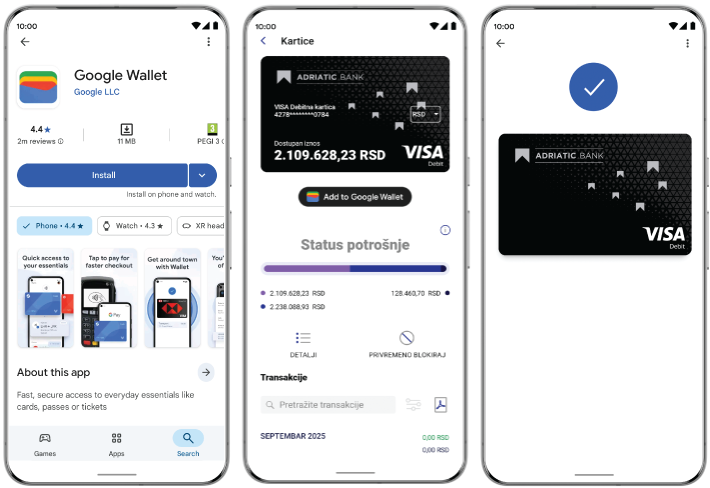
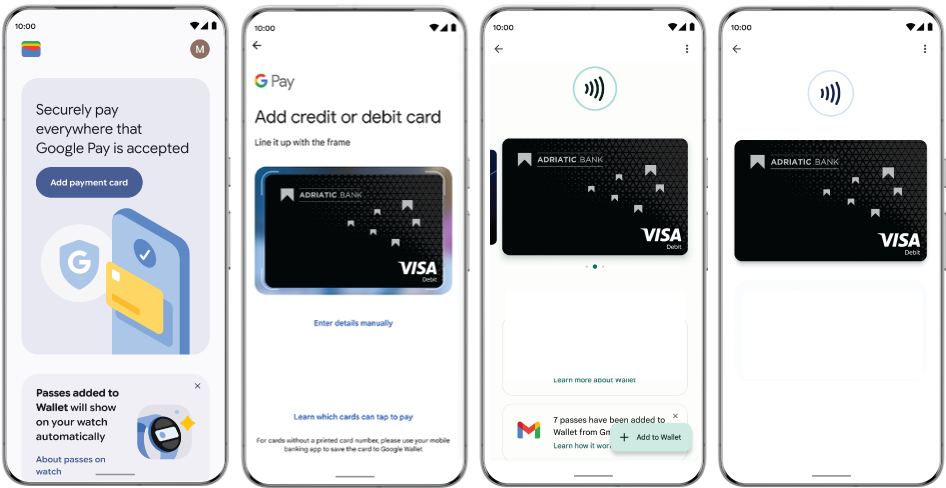
Set Your Adriatic Bank Visa Card as the Default for Even Easier Payments:
- In Google Wallet, select your Adriatic Bank Visa card from the home screen.
- Tap the three dots in the top-right corner.
- Choose “Set as default for contactless payments.”
You’re ready for fast and effortless payments!
How to Pay with Google Pay™
In Stores:
- Look for the Google Pay™ logo or the contactless payment symbol at the checkout.
- Unlock your phone (not required for low-value contactless payments in some regions).
- Hold your phone near the payment terminal.
- Wait for the confirmation of a successful transaction.
Online and In-App Payments:
- Add your Adriatic Bank Visa card to Google Wallet.
- At checkout, select Google Pay™ or tap the “Pay with Google Pay” button.
- Confirm — that’s it! No need to fill out forms or enter card details every time.
What Are the Benefits of Paying with Google Pay™ and Your Adriatic Bank Visa Card?
Fast and convenient: Pay wherever Google Pay™ and contactless payments are accepted. Get through checkout quickly without reaching for your wallet.
Secure: Google Pay™ does not share your actual card number. Your data is protected with advanced encryption and Android security features such as two-step verification.
Fully in your control: Easily manage your cards in Google Wallet. If you lose your phone, use Find My Device to lock or erase it remotely.
Google Pay™ encrypts millions of transactions every day, keeping your payments protected every time.
Frequently Asked Questions (FAQs):
What is Google Wallet?
Google Wallet is a secure digital wallet for Android devices that stores cards, passes, tickets, keys, and personal information.
Why use it with my Adriatic Bank Visa card?
It enables fast and secure transactions wherever contactless payments are accepted, with full privacy and no sharing of your actual card details.
How do I download it?
Download Google Wallet from the Google Play Store on your Android device.
Are there any fees?
No. Transactions have the same fees as when using a physical payment card.
Is it safe to use?
Yes. Advanced security protects your data, and you remain in full control at all times.
For more information, visit pay.google.com or contact Adriatic Bank customer support.